
What does a Guardian do?
A Guardian is the backup for someone’s messages. The author releases their own messages; you step in only if the day comes and they can’t, for example by setting the date a Timeless message is delivered.
How do I accept?
Open the invitation from the email or the link they sent you, then choose to accept. Accepting needs a free MessageFuture account, because you have to be able to sign in if you ever release a message. If you’d rather not, say no on the same page. Nothing is shared with you until you accept.
Where do I find the messages I look after?
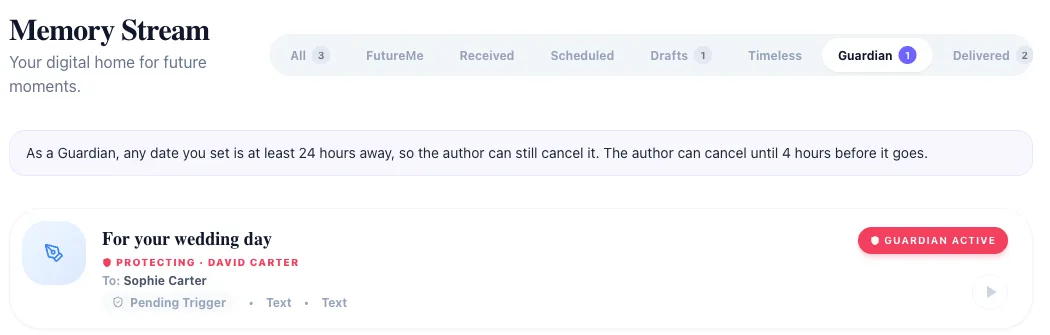
Sign in and open Messages, then the Guardian tab. Each message shows its title, its recipients and Your Guardian Permissions: what the author allowed you to do on that message.
Can I read the messages?
Only if the author turned on Read the message for you. Otherwise you see the title and Content Protected.
How do I release a Timeless message?
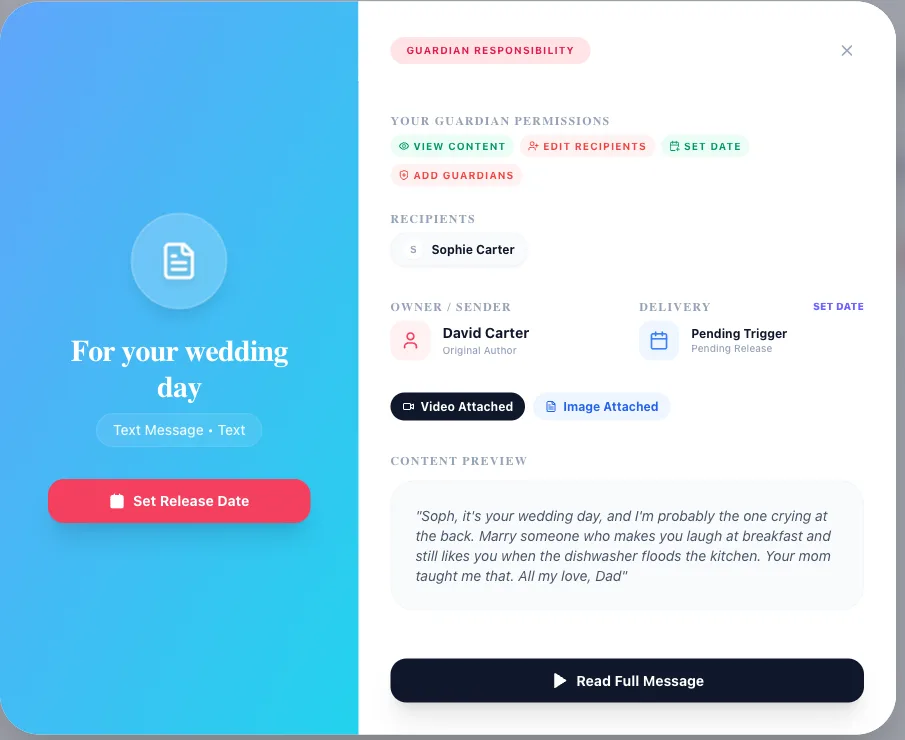
If the author can’t release it and you have permission to set the release date:
- Open the message from the Guardian tab.
- Choose Set Release Date, pick a date and time, and confirm.
Any date you set is at least 24 hours away, so the author can still cancel it. The author can cancel until 4 hours before it goes. The message is then sent on that date.
What else can I do?
Depending on your permissions:
- Change the date of a scheduled message if the day moves.
- Add recipients or contact details. You can add someone with an email address, but never change who is already on it.
- Ask another Guardian to help if you can’t act. You can pass the role to one person, with no more than your own permissions. Someone you add this way can’t add anyone else.
Will the author know what I did?
Yes. The author is told when a Guardian sets a date or adds a recipient.
Can I stop being a Guardian?
Yes. Tell the author, who can take you off a message or revoke your Guardian access at any time.