
Attaching Media
On a paid plan you can add photos, voice notes and video to any message. In the composer, choose what to add, then pick a file or record it there and then. On the Free plan, messages are text only.
How do I add a photo?
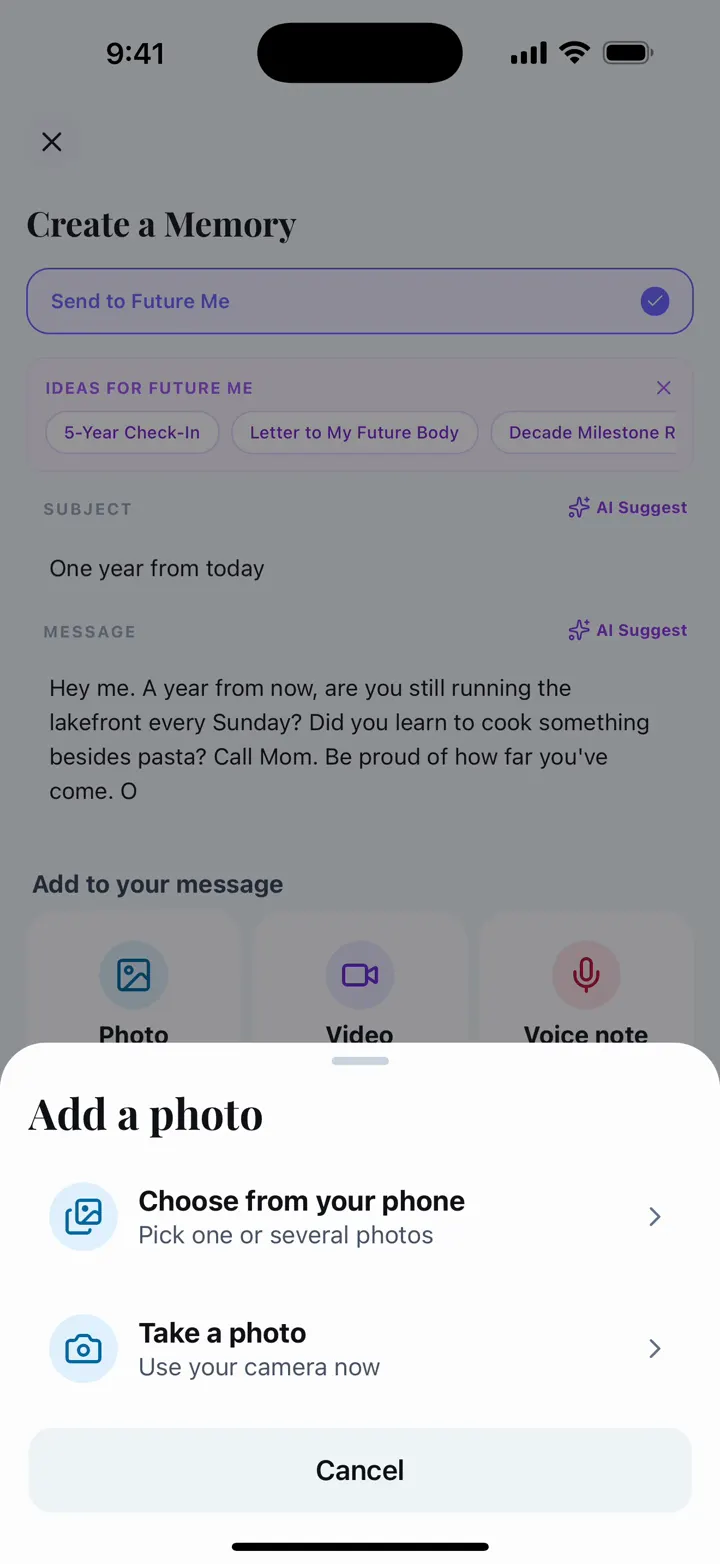
Choose Add a photo, then Choose photos to pick them from your device, or Take a photo with your camera. You can add more than one.
How do I add a voice note?
Choose Add a voice note, then Record a voice note, or Choose an audio file (voice memos, MP3, M4A or WAV).
How do I add a video?
Choose Add a video, then Record a video with your camera, or choose an MP4 or MOV file from your device.
How big can files be?
| Type | Largest file |
|---|---|
| Photo | 20 MB |
| Voice note or audio file | 100 MB |
| Video | 500 MB |
What does media cost?
Photos add 3 credits, a voice note 5 credits for the first 5 minutes, and a video 10 credits for the first 2 minutes. See Credit Costs Reference.
What happens on the Free plan?
Photos, voice notes and videos are part of paid plans. If a message has media, the review screen offers three choices: upgrade to send it with its media, remove the media to send the words only, or keep it as a draft. Media that was already on a message before 26 October 2026 stays and can still be delivered.
Can I remove an attachment?
Yes. Remove it in the composer before you confirm, or edit the message later.